Showing posts with label programming. Show all posts

JAOO 2008 recap

So, time for a (late) JAOO 2008 recap. How was it this year?


The keynotes


Unfortunately, the keynotes were clearly lacking this year, but in very different ways.

Monday, Anders Hejlsberg talked about the future of programming languages. Or should I say, the future of programming languages on the .NET platform. For which there is currently support in Visual Studio. Don't get me wrong, I actually like .NET, even though I hate Windows. But for the opening keynote, talking about F#, LINQ and P-LINQ (with the Pascal background intro that seems to be becoming the slightly dull backdrop for Hejlsberg's talks) simply doesn't cut it. And switching to VS three times to do live demos is just missing the mark by a mile. I was very disappointed with this talk, but mostly because I know how brilliant Hejlsberg is, so I expected more than just an MS-centric view of the future.

Lars Bak talked about V8 tuesday. This keynote was a bit special, because obviously it had to be planned some time in advance, and the V8 project was only revealed very recently.

Working in the office next to Lars and the rest of the Google team here in Aarhus, I was very curious to hear more about what they have been up to for the last few years. In that respect, I certaintly wasn't disappointed. The talk was rich on details, so having no experience with VMs (in the V8 sense, not the VMware sense :-)), I was lost at times. But this was no problem, and it was great to hear Lars explain about the challenges they've been facing in creating V8. Also the QnA session was very good.

So I was very pleased with this keynote, actually. But as someone pointed out to me later on, the topic really wasn't keynote material. Interesting as it was, and popular as the topic is, it was obviously only relevant for a fraction of the audience. Nevertheless, I personally enjoyed this one.

Wednesday's keynote was a complete disaster. The otherwise brilliant Guy Steele and Richard Gabriel (who is also very bright, I'm sure) did their "50 in 50" routine, and I have to say that I absolutely loathed every minute of it.

The tagline was something like: 50 remarks in 50 minutes, each 50 words long (if I recall correctly). The remarks were interspersed with images, audio and video clips. The substance of the talk was a tour through the last many (50?) years of programming languages, sprinkled with uber-geeky humour. Definitely not for me, but fortunately, judging from the reaction of the audience, others liked it better.

However, I'm pretty sure noone enjoyed the fact that they went more than 20 minutes over their time slot. Given that the talk was so rigorous in its form, I simply don't understand how this could happen.

The talks


I didn't see as many talks as I would have liked this year, but I did see some good stuff.

Guy Steele gave a great talk on Fortress. Not unlike the one he gave last year (or was it 2006?) but with even more substance. Some of the maths stuff was over my head, but that didn't matter. The important this was that the talk was interesting and really whet my appetite for learning more about Fortress.

Also, Sun ran a great little competition in the exhibition area this year. A guy came around to our booth with 2-page Fortress program that solves Sudoku puzzles in a massively parallel fashion. The challenge was to figure out how many threads of execution are used, and the prize was a Sun-branded USB stick with the latest snapshot of Fortress on it. I still have the program on my home office wall, and when I feel like it, I look over it and understand another little chunk. Unambitious, you may say, but a lot better than putting it away and forgetting all about it.

Wednesday, a guy from LEGO gave a pretty weak talk about a project that actually looks very interesting. They're building a new "robotics platform" called WeDo, which is basically a $30 (IIRC) kit with a few motors and sensors. This was a challenge spurred by the OLPT project, so various measures have been taken to target it at developing countries. For example, the robot is connected to the laptop with a USB cable because batteries may not be readily available. A very cool project, but the presentation was really a drag... For instance, I now know that LEGO uses Perforce for their software projects, and I would have lived happily on without that piece of information.

Lastly, the talk "The lively kernel" by Dan Ingalis was awesome! I urge you to check out this video demo or simply have a go at it yourself. I'm very curious to see what this project might lead to in the future.

The exhibition floor


Again this year, we had a VMware Denmark stand, and we got to show off our software and tell people what we do.

One thing that we all noticed was how much more aware of virtualization everyone was this year. At last year's JAOO, we were very surprised to learn how many developers simple had no idea that virtualization existed as a concept. But this year, it was different. Maybe because we handed out so many VMware Workstation coupons last year ;-)

On the demo side, we had taken the time to get a VMotion setup up and running this year. Two ESX hosts and a Linux VM running some streaming video server being moved between them. And obviously a third machine running Virtual Center and a VLC player showing the streaming video without a glitch as the VM was moved. A lot of the attendees didn't know that this was possible and wanted to know the details of how it works.

Also, we brought our Mac Mini running the recently-released Fusion 2. With all the Google Chrome hype in full effect, it was a lot of fun showing off Chrome running (apparently) natively on the Mac! Of course, it was running in a Windows VM in unity mode, but we did manage to fool a few people :-)

Version 2 of Fusion also adds the ability to run Linux VMs in Unity mode, so we were able to fire up Chrome, Safari and Evolution side-by-side on the (struggling) Mini.

Conclusion


I didn't go to a lot of talks this year (I was at work most of Tuesday) so I shouldn't pass judgment on the conference as a whole. But I do think the keynotes left a lot to be desired.

Also, I think the Trifork team should reconsider the number of tracks on the conference. Judging from various Ruby-related blogs, the trend for conferences is clearly in the direction of fewer tracks (often just one) and much shorter talks.

I think this makes perfect sense. We go to conferences to widen our perspectives on software development in general. And you really don't need 50 minutes to present new ideas or projects. With so many tracks going on at the same time, attendees constantly need to discard a lot of material. This would be less of a problem if there wasn't such a big overlap between the topics of the tracks. But as it is, I think most developers wish they could follow 2-3 concurrent tracks. This leaves you with a constant feeling of missing out on interesting stuff (which you probably are!), and if you're unlucky enough to attend a boring talk, its 50 precious minutes gone.

I think the organizers should consider cutting the number of tracks and the length of each talk in half. The talks should inspire and engage the audience, and this can easily be done in 25 minutes, leaving us with an urge to know more. The success of a talk should be measured by the surge of hits to the project's website after the talk, not by the number of people still present in the room after 50 minutes.

Quickly jumping to symbols

This is brilliant.

For a while, I have been using ido to quickly jump between buffers and files by just typing any part of the file/buffer name I want. In fact, typing any sequence of letters narrows the interactive search to candidates with names that contain those letters in that order:


fb -> Foobar, FrancisGailBrown

But for finding method definitions in a big source file, I have always just used isearch. It turns out that there is a better way.

By combining imenu with ido, I can quickly find methods as well:


All it takes is this method in my init.el:


(defun ido-goto-symbol ()
"Will update the imenu index and then use ido to select a
symbol to navigate to"
(interactive)
(imenu--make-index-alist)
(let ((name-and-pos '())
(symbol-names '()))
(flet ((addsymbols (symbol-list)
(when (listp symbol-list)
(dolist (symbol symbol-list)
(let ((name nil) (position nil))
(cond
((and (listp symbol) (imenu--subalist-p symbol))
(addsymbols symbol))

((listp symbol)
(setq name (car symbol))
(setq position (cdr symbol)))

((stringp symbol)
(setq name symbol)
(setq position (get-text-property 1 'org-imenu-marker symbol))))

(unless (or (null position) (null name))
(add-to-list 'symbol-names name)
(add-to-list 'name-and-pos (cons name position))))))))
(addsymbols imenu--index-alist))
(let* ((selected-symbol (ido-completing-read "Symbol? " symbol-names))
(position (cdr (assoc selected-symbol name-and-pos))))
(goto-char position))))


I have bound it to C-t, because I realized that I don't use transpose-chars (or whichever transpose method was there..I don't use any of those, really).

I found this trick on the imenu wiki page.

My first AVR-based project

I have always been fascinated by electronics. As a child, I tore apart several rather expensive appliances to see how they worked. Much to my parents' grief, of course.

However, since I got into software development, I haven't given it much thought. Moving several levels of abstraction away from the hardware, your focus shifts quickly to completely different areas.

But recently, this project caught my attention for some reason. So even though I ended up implementing it completely differently, I couldn't stop thinking about the potential of being able to write code for tiny, cheap embedded processors.

I'm not sure why I have never thought of this before. I have considered writing software for PDAs, but they're pretty expensive, and the platform choices are poor. Windows Mobile is a joke, and Palm OS is not very appealing either.

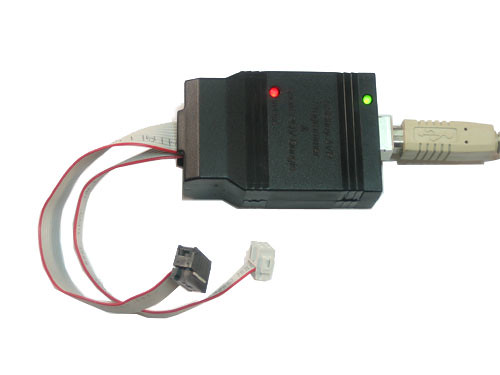
So I decided to take a big step closer to the iron. Knowing nothing about the state of this field, I simply googled for a few starting points. I ended up buying the very cool USBtinyISP programmer kit (and absolutely enjoyed the process of assembling it).


Also, I got the ATtiny26 development board from Active Robots.


This last item, I have later discovered, is probably somewhat outdated. What you want for electronics prototyping these days is the Arduino.


Anyway, the great thing about the ATtiny is that it's cheap (the processor itself is about $4) and it doesn't consume a lot of power.

OK, so what did I do for my debut project? Nothing very interesting, I'm afraid. I wrota a program that simply morses a sentence using the LED built into the development board. I used the GNU toolchain (avr-libc et al) for writing the program and avrdude for flashing it onto the processor. Works great on both Linux and OSX.

In action, this is what it looks like:


And yes, I realize that the quality of the video is too crappy to distinguish the pulses.

Here is the complete source code for this project (sorry about the formatting):


#include <avr/io.h>
#include <string.h>
#include <stdlib.h>
#include <util/delay.h>
#include <avr/pgmspace.h>

/*
* The morse alphabet.
*
* 0: Short pulse
* 1: Long pulse
*/
const char ltr_a[] PROGMEM = "01";
const char ltr_b[] PROGMEM = "1000";
const char ltr_c[] PROGMEM = "1010";
const char ltr_d[] PROGMEM = "100";
const char ltr_e[] PROGMEM = "0";
const char ltr_f[] PROGMEM = "0010";
const char ltr_g[] PROGMEM = "110";
const char ltr_h[] PROGMEM = "0000";
const char ltr_i[] PROGMEM = "00";
const char ltr_j[] PROGMEM = "0111";
const char ltr_k[] PROGMEM = "101";
const char ltr_l[] PROGMEM = "0100";
const char ltr_m[] PROGMEM = "11";
const char ltr_n[] PROGMEM = "10";
const char ltr_o[] PROGMEM = "111";
const char ltr_p[] PROGMEM = "0110";
const char ltr_q[] PROGMEM = "1101";
const char ltr_r[] PROGMEM = "010";
const char ltr_s[] PROGMEM = "000";
const char ltr_t[] PROGMEM = "1";
const char ltr_u[] PROGMEM = "001";
const char ltr_v[] PROGMEM = "0001";
const char ltr_w[] PROGMEM = "011";
const char ltr_x[] PROGMEM = "1001";
const char ltr_y[] PROGMEM = "1011";
const char ltr_z[] PROGMEM = "1100";

PGM_P alphabet[26] PROGMEM = {
ltr_a,ltr_b,ltr_c,ltr_d,ltr_e,ltr_f,ltr_g,ltr_h,ltr_i,ltr_j,ltr_k,
ltr_l,ltr_m,ltr_n,ltr_o,ltr_p,ltr_q,ltr_r,ltr_s,ltr_t,ltr_u,ltr_v,
ltr_w,ltr_x,ltr_y,ltr_z
};

void sleep_msecs(int msecs)
{
/*
* The argument to _delay_ms must be constant (ie. known at compile-time).
*/
int i;
for(i = 0; i < msecs; i++){
_delay_ms(1);
}
}

void set_led_state(int state)
{
PORTB = (state == 1) ? _BV(6) : _BV(0);
}

/*
* Emit single pulse
*
* Length choices are:
* 0: short
* 1: long
*/
void emit_pulse(int length)
{
set_led_state(1);
sleep_msecs((length == 1) ? 210 : 60);
set_led_state(0);
sleep_msecs(100);
}

/*
* Emit a sequence of pulses, eg. "1000" for the letter "b".
*/
void emit_pulses(char *pulse_str)
{
int pulse_str_len = strlen(pulse_str);
int i2;
for (i2 = 0; i2 < pulse_str_len; i2++) {
emit_pulse(pulse_str[i2] == '1');
}
}

void emit_letter(char l)
{
if (l == ' ') {
sleep_msecs(700);
return;
}

char *buf = malloc(8 * sizeof(char));

int index = l - 'a';
PGM_P p;
memcpy_P(&p, &alphabet[index], sizeof(PGM_P));
strcpy_P(buf, p);
emit_pulses(buf);
free(buf);
}

void morse_msg(const char *msg)
{
int len = strlen(msg);
int i;
for (i = 0; i < len; ++i) {
emit_letter(msg[i]);
sleep_msecs(350);
}
}

void do_morse(const char *msg)
{
for(;;){
morse_msg(msg);
sleep_msecs(2500);
}
}

int main(void)
{
/* Init IO */
DDRB = _BV(6); /* make the LED pin an output */

do_morse("er der mon mere kaffe");

/* Not reached */
return 0;
}


In case you're wondering, the morsed message, "er der mon mere kaffe", is danish for "I wonder if there's any more coffee". Indeed, the first thing that sprang to mind when I finally got the software working.

Why I don't like Microsoft

As anyone who follows the virtualization business know by now, this has been a tough week for us at VMware.

CEO Diane Greene stepped back, effective immediately, and was replaced by ex-Microsoft employee Paul Maritz.

This event led to a brief discussion with one of my collegues, who is also a former MS employee, about whether or not Microsoft is an evil company.


(Photo: batmoo)


As he pointed out, MS has invested huge sums in research, and has hired some of the brightest people out there. These people come up with excellent ideas and they receive the funding to put those ideas into practice.

So what is the problem? One word: Windows.


(Photo: aralbalkan)

I am not at all a religious man, and I certaintly don't want to be religious about this either. But the fact of the matter is, I find Windows completely ridiculous as a platform for anything but gaming. This is my honest opinion.

I was frustrated to read an article about Silverlight 2 in the August issue of DDJ. This is actually pretty cool stuff, but it is not for me. I know it runs on my Mac, but you need Windows to do any serious development.


John Lam - what a waste of talent (Photo: timheuer)

I don't have the patience for running Windows, because it sucks terribly. This is hardly a controversial opinion. I tolerate it at work, because the job is otherwise great, but I wouldn't dream of running it on my home computers. Over the last few years, I have come to realize that OSX is the only OS that doesn't suck one way or the other. For a few years, I was running Ubuntu on my laptop, but I was never very happy with it. I was wasting far too much time fixing small problems and trying to get basic stuff like suspend/resume working.

On my MacBook Pro, everything works. I have been using it daily for a few years now, and the number of times is has crashed is still below ten. You would never get that kind of milage from a Windows box, probably not even if you left it idle.

So while I really like .NET, C#, LINQ and all that, I can't use it, because I can't stomach the OS that comes with it. I really don't care very much about whether Microsoft is good or evil, but I'm sad to see so much talent go to waste. This is why I don't like Microsoft.

Breadcrumbs!!

This small addon by William W. Wong really put a smile on my face!

Many of the source files I work with are huge (> 16000 lines), so I almost always need to do an isearch to find the point I need (which is often a pain due to false positives). Also, I often need to temporarily jump to another place in the same file.

Breadcrumbs are a "light" alternative to regular bookmarks, using a trail (or rather, a circular buffer) of anonymous bookmarks across all buffers. I have set up the keybindings to drop a breadcrumb with S-<space> and navigate back/forward with M-C-; and M-C-' respectively.

As a special bonus, a breadcrumb is automatically dropped when using find-tag to make it easy to backtrack after looking up a chain of symbol definitions. Very useful!

The feature is very well documented, by the way.

Effective tags?

A lot of my work hours are spent programming C++ in Emacs on Windows.

Earlier, I've done a lot of Java work in Eclipse and C# work in VS2005. And while I'm overall very, very happy with Emacs, I do miss the source code navigation features from the IDEs (especially Eclipse).

Right now, I'm using the version of ctags that comes with Emacs. Every night a scheduled task scans my source trees and rebuilds the tag files. I know only one keybinding: M-. (find-tag). Of course, I should spend some time familiarizing myself with the build-in tags package, but to be honest, I'm not very impressed with the list of features. Plus, find-tag quite often misses the mark completely.

So, I would like to check out the alternatives. I have been told that the Exuberant version of ctags is better, so I might give that a go.

If anyone has a decent Emacs configuration for setting this up, I'd be happy to see it. Also, any tips on C/C++ code navigation would be greatly appreciated.

Avoiding dired buffer explosion syndrome

I have always been annoyed that dired mode opens a new buffer for each directory it visits. I typically only use each buffer once anyway, and they get in the way of the autocompletion when switching between buffers with C-x b.

Only recently did I learn that simply pressing a instead of enter or C-m makes it reuse the same buffer. Nice!

For some reason, the function is marked dangerous, but that's easily fixed:

(put 'dired-find-alternate-file 'disabled nil)

Productivity hint #2: Don't move your hands!

This one is simple, but important.

To move the cursor left, right, up and down, use C-b, f, p and n respectively.
Page down: C-v
Page up: M-v
Beginning of line: C-a
End of line: C-e

See the point (no pun intended)? Don't move your wrists!

Everytime you do, you waste a little time repositioning your fingers. You may be thinking that the amount of time wasted this way is very small. Well, I disagree. Sure, moving your hand takes only a few tenths of a second, but programmers need to reposition the cursor and scroll up and down ridiculously often.

I'm really surprised to see how many otherwise fast typers haven't taken the time to learn these shortcuts. Really, it's easier than you think, especially because you use these commands all the time. Getting used to the new shortcuts should take you a few hours of determination, at most.

Faster point movement

My day job doesn't include a lot of Lisp hacking.

On the positive side, though, this means that I'm free to redefine "M-C-p" (backward-list) and "M-C-n" (forward-list), because I never use them.

So here is today's init.el addition:


(global-set-key "\M-\C-p"
'(lambda () (interactive) (previous-line 5)))

(global-set-key "\M-\C-n"
'(lambda () (interactive) (next-line 5)))


I use a rather small font, so my 1600x1200 monitors can hold a lot of lines. This snippet allows me to move 5 lines at a time instead of one.

Productivity hints #1: Shift not

In the next few posts, I want to highlight a few productivity boosters that have worked very well for me.

First up: Numbers vs. puctuation.

A standard US keyboard is not designed for programming. You need to press shift to access most punctuation characters: Curly brackets, parentheses, double quotes etc.

So, this brilliant guy took the step and simply remapped the keys!
1 -> !
2 -> @
3 -> #
' -> "
and so on (the numbers are, of course, accessed with shift).

This may sound impossible to get used to, but it's a lot easier than you think! Sure, it takes a few hours and countless wrong keystrokes, but it really pays off.

Combined with the "electric" features of Emacs, this speeds up coding a lot. Try it out for a few hours and see for yourself.

By the ways, the mapping technique described on the linked page is not perfect. He simply swaps the keys with keyboard_translate, so keybindings that include numbers (eg. C-x 2) now require you to press shift to get the number 2. I'm working on improving this, but for now, I've just mapped C-x @ etc.

In general, keep a eye out for any keystrokes that tend for annoy you, or that you get wrong several times a day. For example, I use 2-4 windows per frame, and of course I need to switch between them very often. Therefore, the default shortcut, C-x o was just too slow, and I remapped it to C-o (M-C-o to switch frames, by the way).

Fixing vc-checkin

I use Subversion for a lot of my projects, and I've really enjoy the seamless integration in Emacs. Committing a file is as easy as C-x v v.

However, vc-checkin is slightly broken. It needs a window in which to open the buffer *VC-log* (for you to enter the commit message in) and after you've entered a message and pressed C-c C-c, it closes that window. If you have only one window open in the current frame, it splits your window. Everything is fine...you get your one-window layout back.

But if you have more than one window open, it steals an existing window and closes it. Quite annoying.

So, I decided to fix this using vc-before-checkin-hook. The following hook opens a new window visiting the buffer *VC-log*.


(add-hook
'vc-before-checkin-hook
#'(lambda ()
(set-window-buffer
(split-window-vertically)
(get-buffer-create "*VC-log*"))))


This way, the newly created window will always be selected and closed by vc-checkin, and predictability is restored.