I have always been fascinated by electronics. As a child, I tore apart several rather expensive appliances to see how they worked. Much to my parents' grief, of course.
However, since I got into software development, I haven't given it much thought. Moving several levels of abstraction away from the hardware, your focus shifts quickly to completely different areas.
But recently, this project caught my attention for some reason. So even though I ended up implementing it completely differently, I couldn't stop thinking about the potential of being able to write code for tiny, cheap embedded processors.
I'm not sure why I have never thought of this before. I have considered writing software for PDAs, but they're pretty expensive, and the platform choices are poor. Windows Mobile is a joke, and Palm OS is not very appealing either.
So I decided to take a big step closer to the iron. Knowing nothing about the state of this field, I simply googled for a few starting points. I ended up buying the very cool USBtinyISP programmer kit (and absolutely enjoyed the process of assembling it). 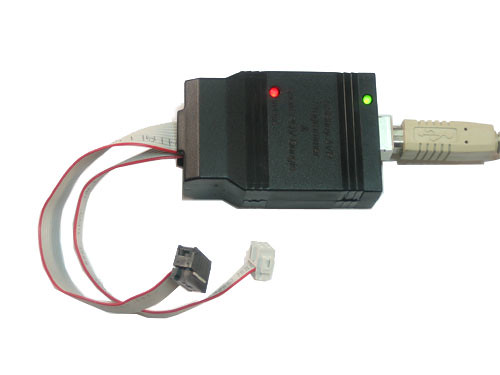
Also, I got the ATtiny26 development board from Active Robots. 
This last item, I have later discovered, is probably somewhat outdated. What you want for electronics prototyping these days is the Arduino. 
Anyway, the great thing about the ATtiny is that it's cheap (the processor itself is about $4) and it doesn't consume a lot of power.
OK, so what did I do for my debut project? Nothing very interesting, I'm afraid. I wrota a program that simply morses a sentence using the LED built into the development board. I used the GNU toolchain (avr-libc et al) for writing the program and avrdude for flashing it onto the processor. Works great on both Linux and OSX.
In action, this is what it looks like:
And yes, I realize that the quality of the video is too crappy to distinguish the pulses.
Here is the complete source code for this project (sorry about the formatting):
#include <avr/io.h>
#include <string.h>
#include <stdlib.h>
#include <util/delay.h>
#include <avr/pgmspace.h>

/*
 * The morse alphabet.
 *
 * 0: Short pulse
 * 1: Long pulse
 */
const char ltr_a[] PROGMEM = "01";
const char ltr_b[] PROGMEM = "1000";
const char ltr_c[] PROGMEM = "1010";
const char ltr_d[] PROGMEM = "100";
const char ltr_e[] PROGMEM = "0";
const char ltr_f[] PROGMEM = "0010";
const char ltr_g[] PROGMEM = "110";
const char ltr_h[] PROGMEM = "0000";
const char ltr_i[] PROGMEM = "00";
const char ltr_j[] PROGMEM = "0111";
const char ltr_k[] PROGMEM = "101";
const char ltr_l[] PROGMEM = "0100";
const char ltr_m[] PROGMEM = "11";
const char ltr_n[] PROGMEM = "10";
const char ltr_o[] PROGMEM = "111";
const char ltr_p[] PROGMEM = "0110";
const char ltr_q[] PROGMEM = "1101";
const char ltr_r[] PROGMEM = "010";
const char ltr_s[] PROGMEM = "000";
const char ltr_t[] PROGMEM = "1";
const char ltr_u[] PROGMEM = "001";
const char ltr_v[] PROGMEM = "0001";
const char ltr_w[] PROGMEM = "011";
const char ltr_x[] PROGMEM = "1001";
const char ltr_y[] PROGMEM = "1011";
const char ltr_z[] PROGMEM = "1100";

PGM_P alphabet[26] PROGMEM = {
    ltr_a,ltr_b,ltr_c,ltr_d,ltr_e,ltr_f,ltr_g,ltr_h,ltr_i,ltr_j,ltr_k,
    ltr_l,ltr_m,ltr_n,ltr_o,ltr_p,ltr_q,ltr_r,ltr_s,ltr_t,ltr_u,ltr_v,
    ltr_w,ltr_x,ltr_y,ltr_z
};

void sleep_msecs(int msecs)
{
   /*
    * The argument to _delay_ms must be constant (ie. known at compile-time).
    */
   int i;
   for(i = 0; i < msecs; i++){
      _delay_ms(1);
   }
}

void set_led_state(int state)
{
   PORTB = (state == 1) ? _BV(6) : _BV(0);
}

/*
 * Emit single pulse
 *
 * Length choices are:
 * 0: short
 * 1: long
 */
void emit_pulse(int length)
{
   set_led_state(1);
   sleep_msecs((length == 1) ? 210 : 60);
   set_led_state(0);
   sleep_msecs(100);
}

/*
 * Emit a sequence of pulses, eg. "1000" for the letter "b".
 */
void emit_pulses(char *pulse_str)
{
   int pulse_str_len = strlen(pulse_str);
   int i2;
   for (i2 = 0; i2 < pulse_str_len; i2++) {
      emit_pulse(pulse_str[i2] == '1');
   }
}

void emit_letter(char l)
{
   if (l == ' ') {
      sleep_msecs(700);
      return;
   }

   char *buf = malloc(8 * sizeof(char));

   int index = l - 'a';
   PGM_P p;
   memcpy_P(&p, &alphabet[index], sizeof(PGM_P));
   strcpy_P(buf, p);
   emit_pulses(buf);
   free(buf);
}

void morse_msg(const char *msg)
{
   int len = strlen(msg);
   int i;
   for (i = 0; i < len; ++i) {
      emit_letter(msg[i]);
      sleep_msecs(350);
   }
}

void do_morse(const char *msg)
{
   for(;;){
      morse_msg(msg);
      sleep_msecs(2500);
   }
}

int main(void)
{
   /* Init IO */
   DDRB = _BV(6); /* make the LED pin an output */

   do_morse("er der mon mere kaffe");

   /* Not reached */
   return 0;
}
In case you're wondering, the morsed message, "er der mon mere kaffe", is danish for "I wonder if there's any more coffee". Indeed, the first thing that sprang to mind when I finally got the software working.