Showing posts with label tips. Show all posts

Quickly jumping to symbols

This is brilliant.

For a while, I have been using ido to quickly jump between buffers and files by just typing any part of the file/buffer name I want. In fact, typing any sequence of letters narrows the interactive search to candidates with names that contain those letters in that order:


fb -> Foobar, FrancisGailBrown

But for finding method definitions in a big source file, I have always just used isearch. It turns out that there is a better way.

By combining imenu with ido, I can quickly find methods as well:


All it takes is this method in my init.el:


(defun ido-goto-symbol ()
"Will update the imenu index and then use ido to select a
symbol to navigate to"
(interactive)
(imenu--make-index-alist)
(let ((name-and-pos '())
(symbol-names '()))
(flet ((addsymbols (symbol-list)
(when (listp symbol-list)
(dolist (symbol symbol-list)
(let ((name nil) (position nil))
(cond
((and (listp symbol) (imenu--subalist-p symbol))
(addsymbols symbol))

((listp symbol)
(setq name (car symbol))
(setq position (cdr symbol)))

((stringp symbol)
(setq name symbol)
(setq position (get-text-property 1 'org-imenu-marker symbol))))

(unless (or (null position) (null name))
(add-to-list 'symbol-names name)
(add-to-list 'name-and-pos (cons name position))))))))
(addsymbols imenu--index-alist))
(let* ((selected-symbol (ido-completing-read "Symbol? " symbol-names))
(position (cdr (assoc selected-symbol name-and-pos))))
(goto-char position))))


I have bound it to C-t, because I realized that I don't use transpose-chars (or whichever transpose method was there..I don't use any of those, really).

I found this trick on the imenu wiki page.
Cat faucet, crude edition

If you're a cat owner, you know that cats love to drink from the faucet!

Being a cat owner myself, I was pretty excited to learn about this Cat Faucet project by Sixerdoodle Electronics. I have often thought about building something similar myself, but I had never gotten around to it.

However, even though the design of the Sixerdoodle Cat Faucet is very elegant, I find it more complicated than necessary (mainly because they wanted to keep it low voltage, it turns out).

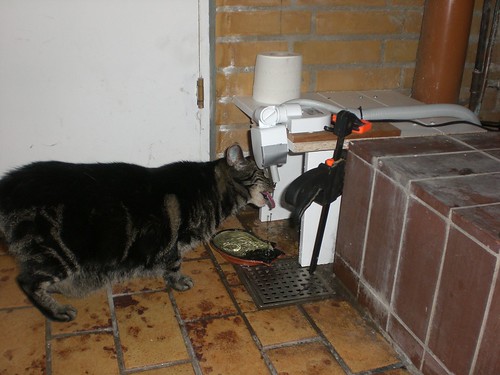
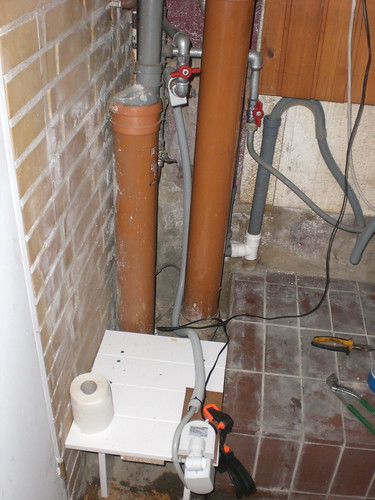
So I started wondering how to build the simplest possible cat faucet. This is what I came up with:


(Open above image, with notes, in a new window)


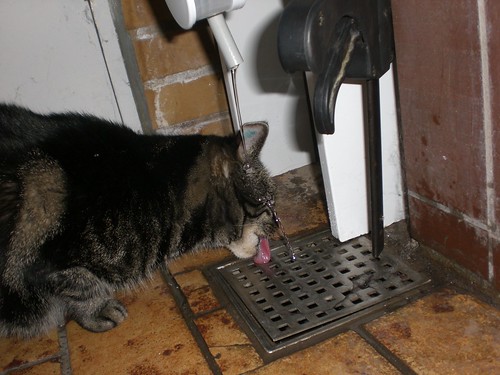
(Diva enjoying the running water)

The complete list of components:


  • a solenoid from an old dishwasher

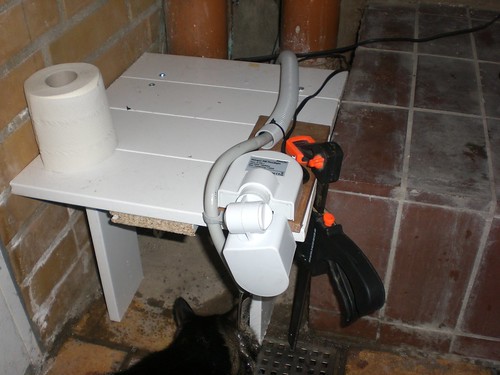
  • a movement sensor (the kind usually used to light up a driveway)

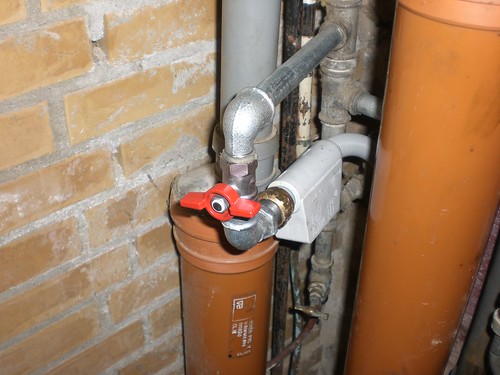
  • a few bits of plumbing

  • a piece of gaffer tape to limit the area monitored by the sensor


(Solenoid from an old dishwasher)


(The movement sensor, pointed straight down)

That's it. The flow of water is controlled simply by adjusting the position of the red valve that lets water into the system. The sensitivity and timeout of the sensor can be controlled with small knobs on the underside.

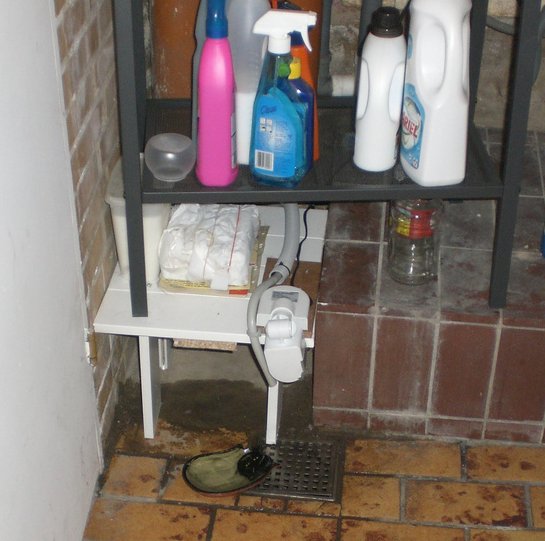
My wife put a little bowl underneath the faucet to allow the cats to drink from a surface of water as well as from the running water. Excess water simply spills down the drain below.

Contrary to the Sixerdoodle design, my cat faucet is not low voltage (it runs on 230V, our mains voltage in Denmark). However, because both components were designed to be safe and withstand pretty rough conditions, this does not worry me at all.


(The finished setup, tucked away under a small shelving unit)


(Obviously, it takes a little practice!)

Breadcrumbs!!

This small addon by William W. Wong really put a smile on my face!

Many of the source files I work with are huge (> 16000 lines), so I almost always need to do an isearch to find the point I need (which is often a pain due to false positives). Also, I often need to temporarily jump to another place in the same file.

Breadcrumbs are a "light" alternative to regular bookmarks, using a trail (or rather, a circular buffer) of anonymous bookmarks across all buffers. I have set up the keybindings to drop a breadcrumb with S-<space> and navigate back/forward with M-C-; and M-C-' respectively.

As a special bonus, a breadcrumb is automatically dropped when using find-tag to make it easy to backtrack after looking up a chain of symbol definitions. Very useful!

The feature is very well documented, by the way.

Avoiding dired buffer explosion syndrome

I have always been annoyed that dired mode opens a new buffer for each directory it visits. I typically only use each buffer once anyway, and they get in the way of the autocompletion when switching between buffers with C-x b.

Only recently did I learn that simply pressing a instead of enter or C-m makes it reuse the same buffer. Nice!

For some reason, the function is marked dangerous, but that's easily fixed:

(put 'dired-find-alternate-file 'disabled nil)

Productivity hint #2: Don't move your hands!

This one is simple, but important.

To move the cursor left, right, up and down, use C-b, f, p and n respectively.
Page down: C-v
Page up: M-v
Beginning of line: C-a
End of line: C-e

See the point (no pun intended)? Don't move your wrists!

Everytime you do, you waste a little time repositioning your fingers. You may be thinking that the amount of time wasted this way is very small. Well, I disagree. Sure, moving your hand takes only a few tenths of a second, but programmers need to reposition the cursor and scroll up and down ridiculously often.

I'm really surprised to see how many otherwise fast typers haven't taken the time to learn these shortcuts. Really, it's easier than you think, especially because you use these commands all the time. Getting used to the new shortcuts should take you a few hours of determination, at most.

Faster point movement

My day job doesn't include a lot of Lisp hacking.

On the positive side, though, this means that I'm free to redefine "M-C-p" (backward-list) and "M-C-n" (forward-list), because I never use them.

So here is today's init.el addition:


(global-set-key "\M-\C-p"
'(lambda () (interactive) (previous-line 5)))

(global-set-key "\M-\C-n"
'(lambda () (interactive) (next-line 5)))


I use a rather small font, so my 1600x1200 monitors can hold a lot of lines. This snippet allows me to move 5 lines at a time instead of one.

Productivity hints #1: Shift not

In the next few posts, I want to highlight a few productivity boosters that have worked very well for me.

First up: Numbers vs. puctuation.

A standard US keyboard is not designed for programming. You need to press shift to access most punctuation characters: Curly brackets, parentheses, double quotes etc.

So, this brilliant guy took the step and simply remapped the keys!
1 -> !
2 -> @
3 -> #
' -> "
and so on (the numbers are, of course, accessed with shift).

This may sound impossible to get used to, but it's a lot easier than you think! Sure, it takes a few hours and countless wrong keystrokes, but it really pays off.

Combined with the "electric" features of Emacs, this speeds up coding a lot. Try it out for a few hours and see for yourself.

By the ways, the mapping technique described on the linked page is not perfect. He simply swaps the keys with keyboard_translate, so keybindings that include numbers (eg. C-x 2) now require you to press shift to get the number 2. I'm working on improving this, but for now, I've just mapped C-x @ etc.

In general, keep a eye out for any keystrokes that tend for annoy you, or that you get wrong several times a day. For example, I use 2-4 windows per frame, and of course I need to switch between them very often. Therefore, the default shortcut, C-x o was just too slow, and I remapped it to C-o (M-C-o to switch frames, by the way).

Fixing vc-checkin

I use Subversion for a lot of my projects, and I've really enjoy the seamless integration in Emacs. Committing a file is as easy as C-x v v.

However, vc-checkin is slightly broken. It needs a window in which to open the buffer *VC-log* (for you to enter the commit message in) and after you've entered a message and pressed C-c C-c, it closes that window. If you have only one window open in the current frame, it splits your window. Everything is fine...you get your one-window layout back.

But if you have more than one window open, it steals an existing window and closes it. Quite annoying.

So, I decided to fix this using vc-before-checkin-hook. The following hook opens a new window visiting the buffer *VC-log*.


(add-hook
'vc-before-checkin-hook
#'(lambda ()
(set-window-buffer
(split-window-vertically)
(get-buffer-create "*VC-log*"))))


This way, the newly created window will always be selected and closed by vc-checkin, and predictability is restored.